Laura M. Foley Design
  • Email
  • Facebook
  • Linkedin
  • Twitter
  • Youtube
  • Rss
  • Home
  • Design
    • PowerPoint Design
    • Themes and Style Guides
  • Training
    • 1-on-1 PowerPoint Training
    • Group training
      • The Cheating Death by PowerPoint Seminar
      • Customized Cheating Death by PowerPoint Seminar
      • Advanced Cheating Death by PowerPoint Workshop
      • The Cheating Death by PowerPoint Daylong Intensive
    • Presentation Reviews
  • Gallery
  • Kudos
  • Blog
  • Free eBook!
  • Resources
  • Cost
  • About
  • Contact
Search
Home» Mistakes » Do you need header and footer blocks on PowerPoint slides? No.

Do you need header and footer blocks on PowerPoint slides? No.

Posted by Laura Foley - September 20, 2012 - Mistakes, PowerPoint, Presentation Skills
0

We see it all the time—a slide that has a large, colored bar along the top for the title and another one along the bottom for a logo, page number, and various other footer items. Why has this become the norm? It’s true that many of the templates that come standard with PowerPoint use this convention, so maybe people think it’s OK to follow it. Well, folks, the doctor is IN and I’m here to tell you that this convention stinks.

Not only do your slides look boring and uninspired as a result of using large headers and footers, you’re also squandering valuable real estate.

Jim Smith is a colleague of mine who specializes in helping healthcare organizations to use and present data more effectively. He has a real problem with these types of slides, and so have I. Jim’s come up with a great way to demonstrate how much space is wasted when you design slides in this way, and he has graciously agreed to allow me to share it with you.

Let’s revisit a slide that was featured in a Slide Makeover of the Month earlier this year.

Tuskegee Airmen slide: before

Pretty typical stuff, right? But let’s look at the area of the slide that’s devoted to these running headers and footers.
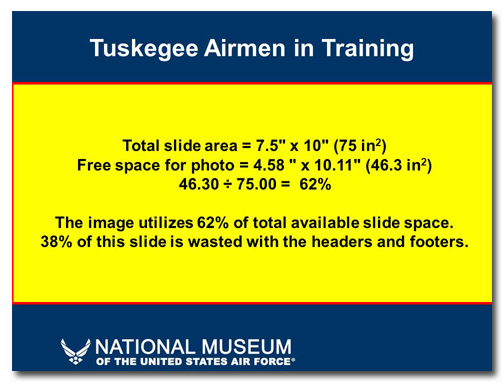
Headers and footers take up too much space

As you can see, a significant amount of real estate is gobbled up with these headers and footers.

Let’s see what the first slide looks like without the header and footer:
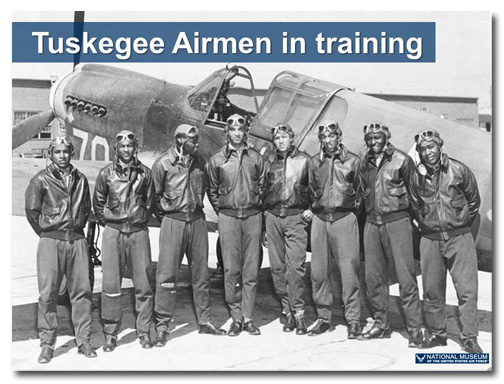
Tuskegee Airmen slide: after

Now the photo can be much bigger, giving it more impact and allowing the audience to see the details. And here’s the math:
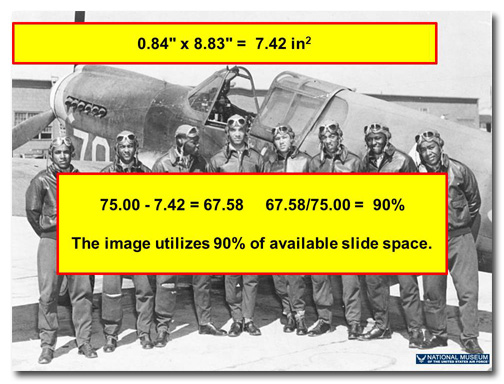
Create more space by eliminating headers and footers

Just because other people are using these oversized header and footer blocks doesn’t mean you have to do it. If all the boring presentation designers jumped off the Empire State Building would you do it too?

Email
Cheating Death by PowerPoint, Death by PowerPoint, decks, mistakes, presentation, slides

Leave a Reply Cancel reply

Your email address will not be published. Required fields are marked *


5 − one =

You may use these HTML tags and attributes: <a href="" title=""> <abbr title=""> <acronym title=""> <b> <blockquote cite=""> <cite> <code> <del datetime=""> <em> <i> <q cite=""> <strike> <strong>

Body image slide: Before

May 2013 Slide Makeover of the Month

It’s good to use pictures in your PowerPoint presentations. But make sure you use the right ones, or you’ll confuse your [...]

Read More

Free eBook
and slide makeover!

Free eBook!

Sign up below to receive a free eBook, Cheating Death by PowerPoint: Essential PowerPoint Tips, Tricks, and Best Practices. You'll also receive the Design Dispatch, a monthly newsletter full of PowerPoint goodness and qualify for a free slide makeover!

Cheating Death by PowerPoint Blog

  • How to make your own clipart in PowerPoint
  • Call me maybe: It’s bad marketing to make people work
  • The best PowerPoint trick you don’t know about

Laura M. Foley Design
PO Box 453
Hubbardston, MA 01452

  • (978) 820-1149
  • laura@lauramfoley.com
  • Contact Us
  • cheatingdeathbypowerpoint
    • Facebook
    • Linkedin
    • Youtube
    • Twitter
    • Rss
© 2013 Laura M. Foley Design, PO Box 453, Hubbardston, MA 01452